How to login to your website

How to login

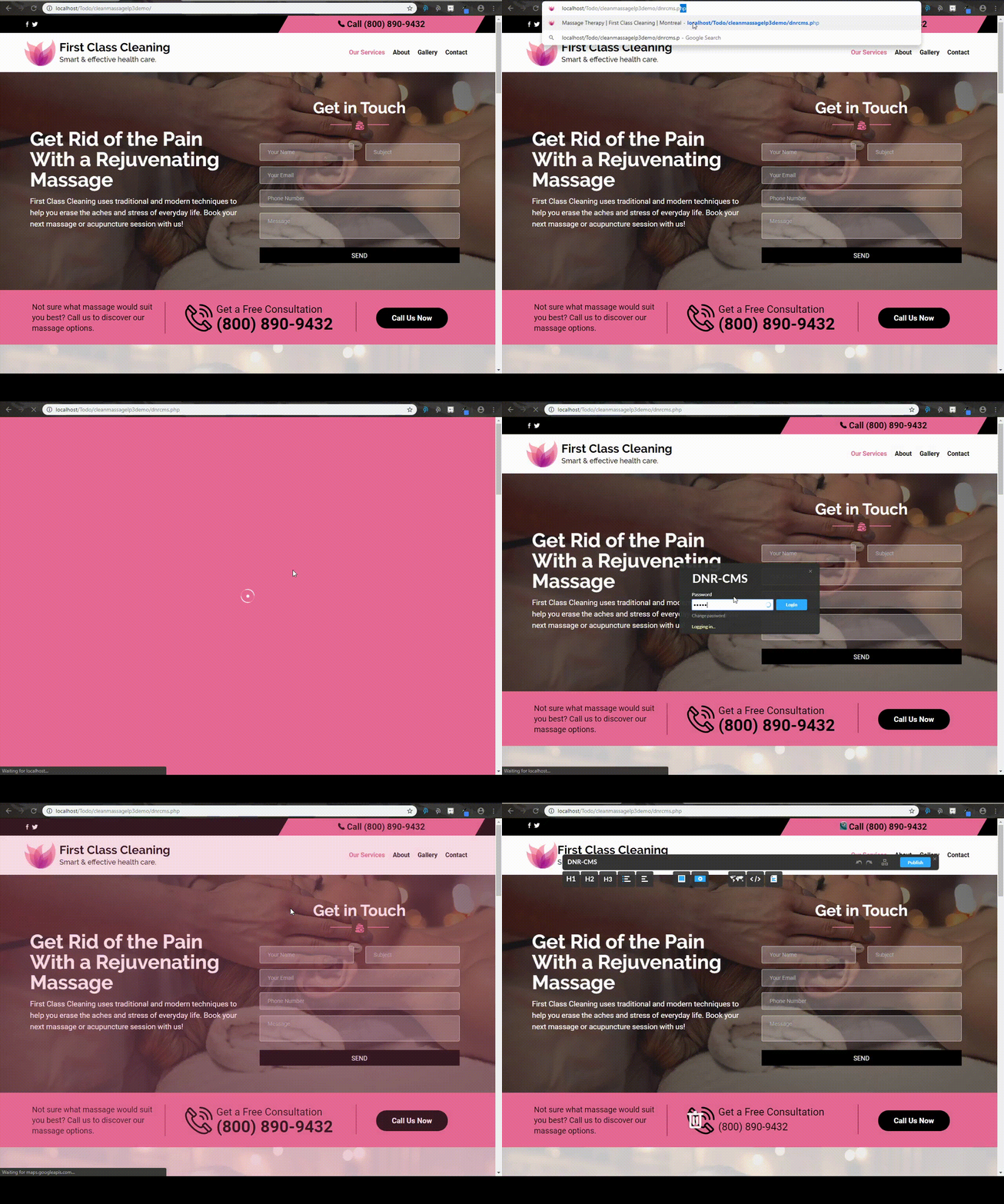
In order to be able to edit your website, you must first login to the DnrCMS admin. 

To do so, simply append dnrcms.php to the end of your website url. For example, if your website is www.designnrank.com, you would need to go to www.designnrank.com/dnrcms.php in order to login to the administrator panel.

Your login Credentials should have also been sent when you signed up.
  • 0 Корисниците го најдоа ова како корисно
Дали Ви помогна овој одговор?

Понудени резултати

Website Changes (Publishing Changes)

Reverting Changes In order to revert changes, you must simply press CTRL and Z simultaneously....

Website Changes (Adding or removing images from the gallery)

Adding or removing images from the gallery In order to add images to the gallery, you can use...

Website Changes (Adding Adding a Google Map / Editing Existing Map)

Adding a Google Map To add a Google Map with your location to your website, you can simply drag...

Website Changes (Attaching files to your website)

Attaching files to your website You can attach files to your website by dragging the "Upload...

Website Changes (Embedding Youtube and Twitter links)

Embedding Youtube and Twitter links You may also add embedded Youtube videos or Twitter posts by...