Website Changes (Adding Text)

Adding Text

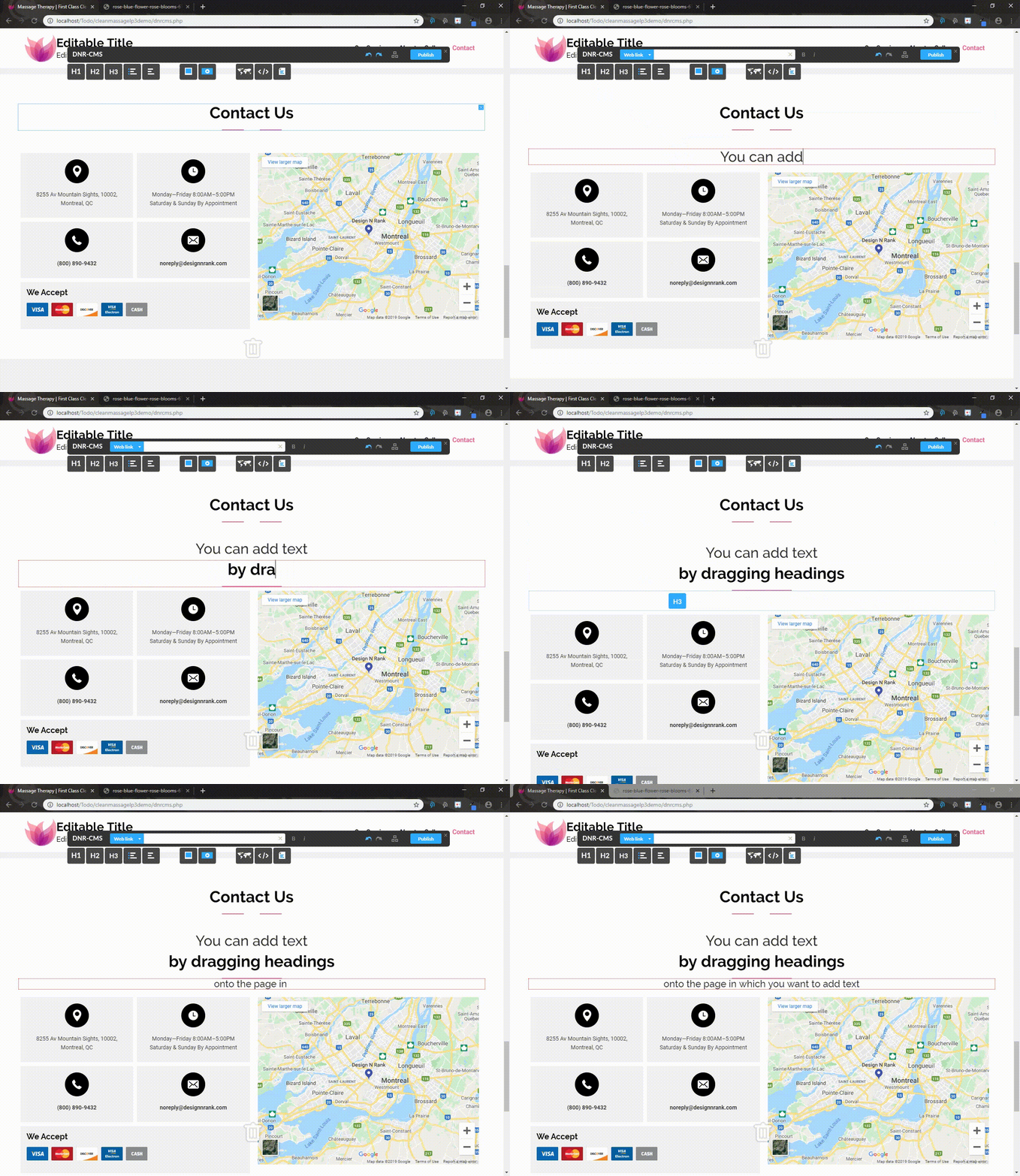
In order to add text, drag one of the options from the DnRCMS onto the page in the area you would like. 

H1, H2, H3 are all different sizes of text and reflect the headers of the site. 

Note: It's better for SEO if you following the Header Scheme in Order going H1, H2 and then H3 not out of order. It can be H1, H2, H3, H2, H3 as an example. 
  • 0 utilizatori au considerat informaţia utilă
Răspunsul a fost util?

Articole similare

Website Changes (Publishing Changes)

Reverting Changes In order to revert changes, you must simply press CTRL and Z simultaneously....

Website Changes (Adding or removing images from the gallery)

Adding or removing images from the gallery In order to add images to the gallery, you can use...

Website Changes (Adding Adding a Google Map / Editing Existing Map)

Adding a Google Map To add a Google Map with your location to your website, you can simply drag...

Website Changes (Attaching files to your website)

Attaching files to your website You can attach files to your website by dragging the "Upload...

Website Changes (Embedding Youtube and Twitter links)

Embedding Youtube and Twitter links You may also add embedded Youtube videos or Twitter posts by...