Website Changes (Editing Text)

Editing Text

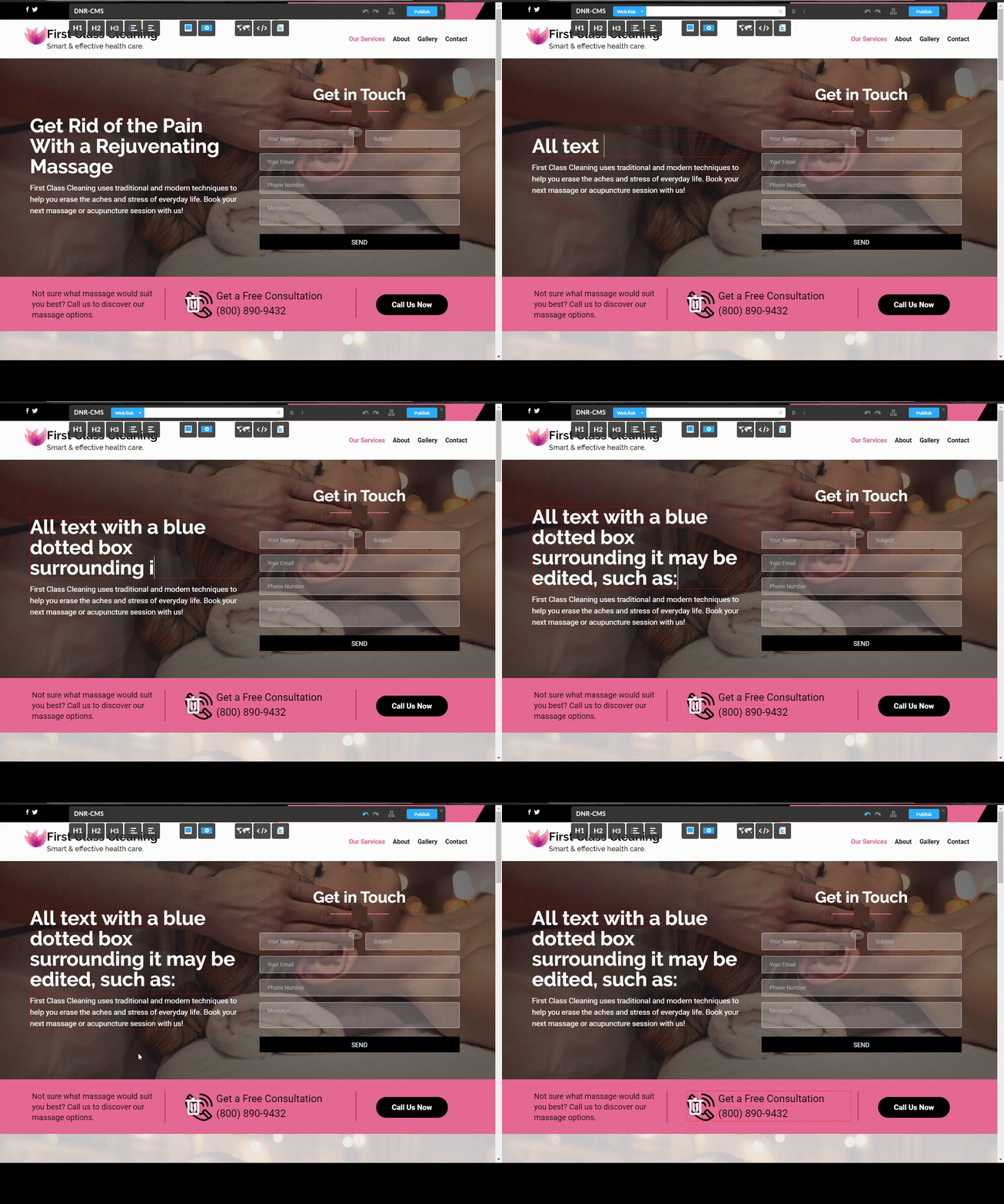
1) First of all, to verify if a textbox is editable, simply hover your mouse over the text you would like to edit and if a blue box appears around the textbox, this means that the text can be edited.

2) To edit said text, left click inside the blue box and you will enter edit mode.

3) Finally, to exit edit mode, left click anywhere outside the textbox area.

Note that this won't directly publish changes to your website. In order to publish all modifications to your website, visit the Publishing Modifications Guide. 
  • 0 Els usuaris han Trobat Això Útil
Ha estat útil la resposta?

Articles Relacionats

Website Changes (Publishing Changes)

Reverting Changes In order to revert changes, you must simply press CTRL and Z simultaneously....

Website Changes (Adding or removing images from the gallery)

Adding or removing images from the gallery In order to add images to the gallery, you can use...

Website Changes (Adding Adding a Google Map / Editing Existing Map)

Adding a Google Map To add a Google Map with your location to your website, you can simply drag...

Website Changes (Attaching files to your website)

Attaching files to your website You can attach files to your website by dragging the "Upload...

Website Changes (Embedding Youtube and Twitter links)

Embedding Youtube and Twitter links You may also add embedded Youtube videos or Twitter posts by...